|
Administrators' overview > Unlocking individuals Unlocking individuals |
Home
Topic above
Next topic

|
|
Administrators' overview > Unlocking individuals Unlocking individuals |
Home
Topic above
Next topic
|
Any individual who exceeds three attempts to answer security questions correctly, is locked out of the system - only an administrator of the individual's admin/user group has unlock permissions.
Before you start
| 1. | You must be logged in as an administrator of the admin/user group whose member(s) are locked out of the system. |
You can only unlock individuals who belong to admin/user groups which were created by yourself or another administrator in your admin group.
| 2. | Ascertain that the individual who has been "locked" has the right to make bookings against the given account. |
Actions
| 1. | Select ADMIN > Login Management > Unlock User/Reset User. |
| 2. | Search for the individual. |
| 3. | When the search results are displayed, the individual that needs to be unlocked can be identified using the following criteria: |
| o | Status: Locked |
| o | Reason: Security Question |
| o | Unlock: Unlock |
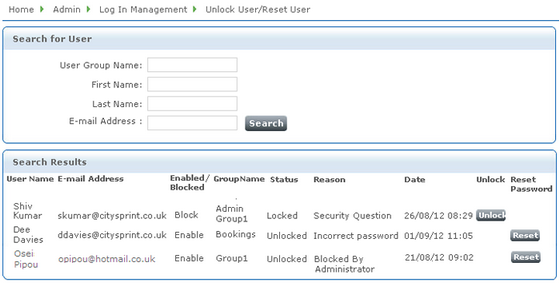
Sample search results
| 4. | Click Unlock for that record. |
Related topics